


The software development landscape continues to evolve rapidly, speed, automation, and collaboration are more important than ever. Development teams are expected to deliver high-quality software faster while maintaining security, reliability, and scalability. As organizations embrace Agile, DevOps, and cloud-native technologies, manual build and deployment processes are no longer enough to meet modern software delivery demands.
This is where Continuous Integration and Continuous Delivery (CI/CD) tools become indispensable. CI/CD platforms automate code integration, testing, deployment, and release management, enabling teams to deliver software updates more efficiently while minimizing errors and reducing deployment risks.
Whether you’re an experienced DevOps engineer or just beginning your automation journey, choosing the right CI/CD platform can significantly improve your software development lifecycle. Organizations looking to implement scalable automation can benefit from DevOps consulting services to design and optimize CI/CD pipelines that align with their business objectives.
In this guide, their key features, benefits, and how they help organizations streamline software delivery and accelerate digital transformation.
What are CI/CD Tools?
CI/CD tools are software platforms that automate the process of building, testing, integrating, and deploying applications throughout the Software Development Life Cycle (SDLC). They enable development and operations teams to collaborate more effectively while ensuring that code changes are continuously validated before reaching production.
Continuous Integration (CI) is the practice of frequently merging code changes into a shared repository. Every code commit automatically triggers processes such as code compilation, automated testing, and quality validation, helping teams identify bugs early and reduce integration conflicts.
Continuous Delivery/Continuous Deployment (CD) extends this process by automatically deploying validated code to testing, staging, or production environments. This ensures faster, more reliable releases with minimal manual intervention.
Together, CI and CD help organizations:
- Automate repetitive development tasks
- Improve software quality through continuous testing
- Accelerate release cycles
- Reduce deployment failures
- Enhance collaboration across development and operations teams
- Deliver a consistent user experience
As organizations adopt cloud-native development and DevOps practices, CI/CD tools have become essential for building scalable, secure, and reliable software delivery pipelines.
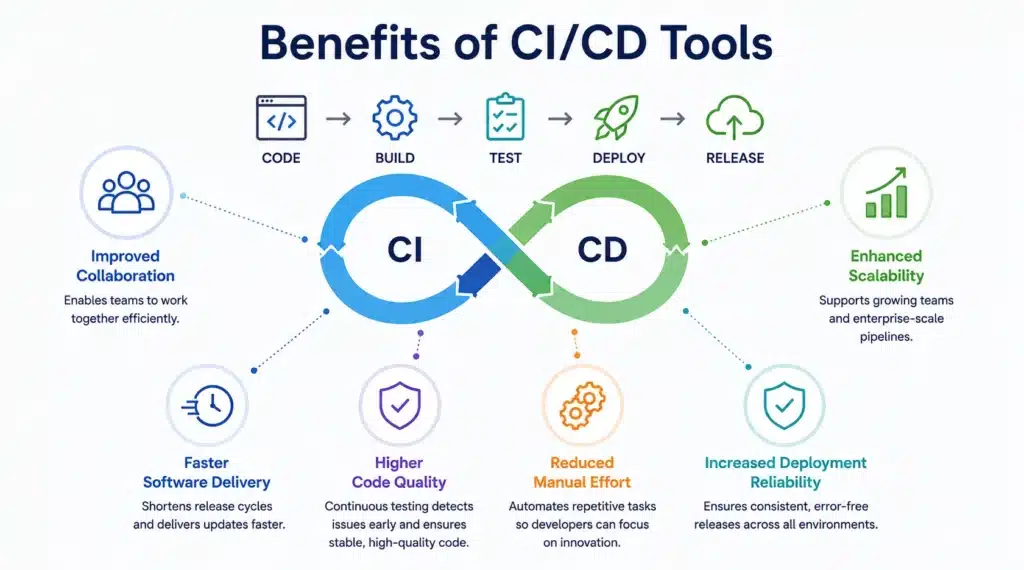
Implementing CI/CD tools offers significant advantages for modern software development teams, regardless of project size or industry.
Improved Collaboration
Frequent code integration enables developers to work on shared codebases more efficiently, reducing merge conflicts and improving collaboration across cross-functional teams.
Faster Software Delivery
Automated build, testing, and deployment pipelines shorten release cycles, allowing organizations to deliver new features and updates more frequently.
Higher Code Quality
Continuous testing validates every code change before deployment, helping teams detect bugs early and maintain stable, high-quality applications.
Reduced Manual Effort
By automating repetitive tasks such as builds, testing, and deployments, developers can focus on innovation rather than operational overhead.
Increased Deployment Reliability
Automated deployments reduce human error and ensure consistent software releases across development, testing, and production environments.
Enhanced Scalability
Modern CI/CD platforms integrate seamlessly with:
- Kubernetes
- Docker
- Public cloud platforms
- Hybrid cloud environments
- Infrastructure as Code (IaC)
This enables organizations to scale development operations without significantly increasing operational complexity.
Organizations modernizing software delivery often combine CI/CD adoption with DevOps Benefits and Implementation Strategies to build a scalable automation framework that supports long-term growth.
Top CI/CD Tools at a Glance
Choosing the right CI/CD tool depends on your organization’s workflows, infrastructure, and business requirements. The following platforms stand out for their automation capabilities, seamless integrations, and support for modern DevOps practices.
| CI/CD Tool | Best For | Key Strength |
| Bitbucket | End-to-end CI/CD | Native Atlassian ecosystem integration |
| Bamboo | Continuous Integration | Enterprise-grade build automation |
| Bitbucket Pipelines | Workflow Automation | Built-in YAML pipeline configuration |
| Jira Software | Issue Tracking | Agile project and issue management |
| Confluence | Documentation & Knowledge Sharing | Collaborative documentation |
Each of these tools addresses a specific aspect of the software development lifecycle. When combined, they create a connected DevOps ecosystem that improves collaboration, visibility, and deployment efficiency.
Why CI/CD Matters
Together, Continuous Integration and Continuous Delivery enable organizations to:
- Automate repetitive software delivery tasks
- Improve software quality through continuous testing
- Accelerate software releases
- Reduce deployment failures
- Increase deployment consistency
- Improve collaboration between development, QA, operations, and security teams
- Support cloud-native and microservices-based applications
As organizations continue adopting Agile and DevOps methodologies, CI/CD has evolved from a competitive advantage into a business necessity.
Teams planning enterprise-wide DevOps adoption should also explore DevOps Lifecycle Phases to better understand how CI/CD fits into the complete software delivery process.
Why These CI/CD Tools Stand Out
Modern DevOps teams require more than just build automation. Today’s CI/CD platforms support cloud-native development, Infrastructure as Code (IaC), automated testing, security integration, and real-time collaboration across distributed teams.
Organizations are also prioritizing Cloud and DevOps integration to streamline deployments across public cloud, private cloud, and hybrid environments while maintaining scalability, compliance, and operational consistency.
In the following sections, we’ll explore each platform in detail, highlighting its key features, benefits, and ideal use cases to help you choose the right CI/CD solution for your DevOps strategy.
Best Overall CI/CD Tool: Bitbucket
When it comes to managing source code, enabling collaboration, and automating software delivery, Bitbucket continues to be one of the most reliable CI/CD platforms. As part of the Atlassian ecosystem, Bitbucket provides developers with a centralized platform for repository management while integrating seamlessly with Jira Software, Confluence, and Bitbucket Pipelines.
Bitbucket simplifies the entire software development lifecycle by allowing teams to manage repositories, review code, automate deployments, and track development progress from a single platform. Its native CI/CD capabilities make it an excellent choice for organizations looking to streamline DevOps workflows without relying on multiple third-party tools.
Organizations focused on optimizing CI/CD pipelines can leverage Bitbucket Pipelines to automate builds, testing, and deployments, improving release speed and software reliability while reducing manual intervention.
Key Features
- Integrated CI/CD Pipelines: Automate builds, testing, and deployments directly within Bitbucket using Bitbucket Pipelines.
- Branch Permissions: Protect critical branches with customizable access controls and approval workflows.
- Pull Requests & Code Reviews: Improve code quality through collaborative reviews, inline comments, and merge checks.
- Native Atlassian Integration: Connect seamlessly with Jira Software and Confluence for complete project visibility.
- Security Controls: Manage repository access, branch restrictions, and deployment permissions securely.
Why Choose Bitbucket?
Bitbucket is ideal for organizations already using the Atlassian ecosystem. It provides a unified environment for source code management, collaboration, and deployment automation, helping development teams deliver software faster while maintaining governance and code quality.
Best for Continuous Integration: Bamboo
For organizations requiring enterprise-grade Continuous Integration, Bamboo remains a trusted solution. Designed specifically for build automation, testing, and release management, Bamboo enables development teams to automate repetitive tasks while maintaining complete visibility across the software delivery pipeline.
Its deep integration with Bitbucket and Jira makes Bamboo particularly valuable for organizations using Atlassian products as part of their DevOps ecosystem.
Key Features
- Automated Builds and Testing: Trigger automated builds and execute tests whenever code changes are committed.
- Deployment Projects: Create reusable deployment plans across development, staging, and production environments.
- Jira Integration: View build status, deployment history, and release information directly within Jira issues.
- Parallel Builds: Reduce build times by executing multiple jobs simultaneously.
- Release Management: Automate software releases while maintaining version control and deployment traceability.
Why Choose Bamboo?
Bamboo is best suited for enterprise organizations that require reliable Continuous Integration, automated testing, and controlled software releases. Its ability to manage complex build pipelines and deployment workflows makes it an excellent solution for large-scale DevOps environments.
Best for Workflow Automation: Bitbucket Pipelines
Automation is at the heart of every successful DevOps strategy, and Bitbucket Pipelines simplifies CI/CD workflow automation by allowing teams to define pipelines directly within their repositories.
Using simple YAML configuration files, developers can automate builds, testing, security validation, and deployments without maintaining dedicated CI/CD infrastructure. This reduces operational overhead while improving deployment consistency.
Key Features
- Configuration as Code: Define pipelines using YAML files that can be version-controlled alongside application code.
- Docker Support: Run builds inside Docker containers for consistent and reproducible environments.
- Integrated Repository Management: Connect CI/CD workflows directly with Bitbucket repositories.
- Scalable Cloud Infrastructure: Execute builds without managing dedicated servers.
- Deployment Automation: Automatically deploy applications after successful testing and validation.
Why Choose Bitbucket Pipelines?
Bitbucket Pipelines is an excellent choice for organizations seeking a lightweight yet powerful CI/CD solution. Its cloud-native architecture, ease of configuration, and native integration with Bitbucket make it ideal for Agile and DevOps teams looking to accelerate software delivery.
Organizations adopting automation strategies should also explore How DevOps Automates Processes in Software Development to learn how automated workflows accelerate software delivery.
Best for Issue Tracking: Jira Software

Effective issue tracking is essential for successful software development, and Jira Software remains one of the most trusted tools for Agile and DevOps teams. More than just an issue tracker, Jira helps teams plan, prioritize, and monitor projects while providing complete visibility into the software development lifecycle.
Its seamless integration with Bitbucket, Bamboo, and Confluence enables development teams to connect code changes, pull requests, builds, and deployments directly to project tasks. This improves collaboration, increases transparency, and helps teams deliver software more efficiently.
Key Features
- Customizable Workflows: Configure workflows that align with your team’s development and approval processes.
- Real-Time Reporting: Track sprint progress, team performance, and project health using dashboards and reports.
- Issue Tracking: Monitor bugs, feature requests, tasks, and releases from a centralized platform.
- Development Integration: Link commits, branches, pull requests, and deployments directly to Jira issues.
- Agile Project Management: Support Scrum, Kanban, and hybrid Agile methodologies.
Why Choose Jira Software?
Jira Software is an excellent choice for organizations looking to improve project visibility, collaboration, and Agile delivery. Its powerful reporting capabilities and seamless integration with the Atlassian ecosystem make it a central hub for managing software development projects.
Best for Documentation and Knowledge Sharing: Confluence
Successful DevOps teams rely on effective documentation to ensure knowledge is shared across development, operations, QA, and business teams. Confluence provides a centralized workspace where organizations can create, organize, and collaborate on technical documentation, project plans, knowledge bases, and standard operating procedures.
By integrating directly with Jira Software, Confluence enables teams to connect documentation with development activities, ensuring that project information remains current and easily accessible.
Key Features
- Collaborative Editing: Multiple users can create and edit documents simultaneously.
- Ready-to-Use Templates: Quickly create documentation using pre-built templates for technical documents, meeting notes, and project plans.
- Knowledge Management: Build searchable knowledge bases that improve information sharing across teams.
- Jira Integration: Link project documentation directly with Jira issues and development activities.
- Access Control: Manage permissions to ensure secure collaboration across departments.
Why Choose Confluence?
Confluence simplifies documentation management while improving collaboration across cross-functional teams. Whether you’re documenting CI/CD workflows, deployment processes, or project requirements, it helps ensure everyone has access to accurate and up-to-date information.
Best Practices for Implementing CI/CD Successfully
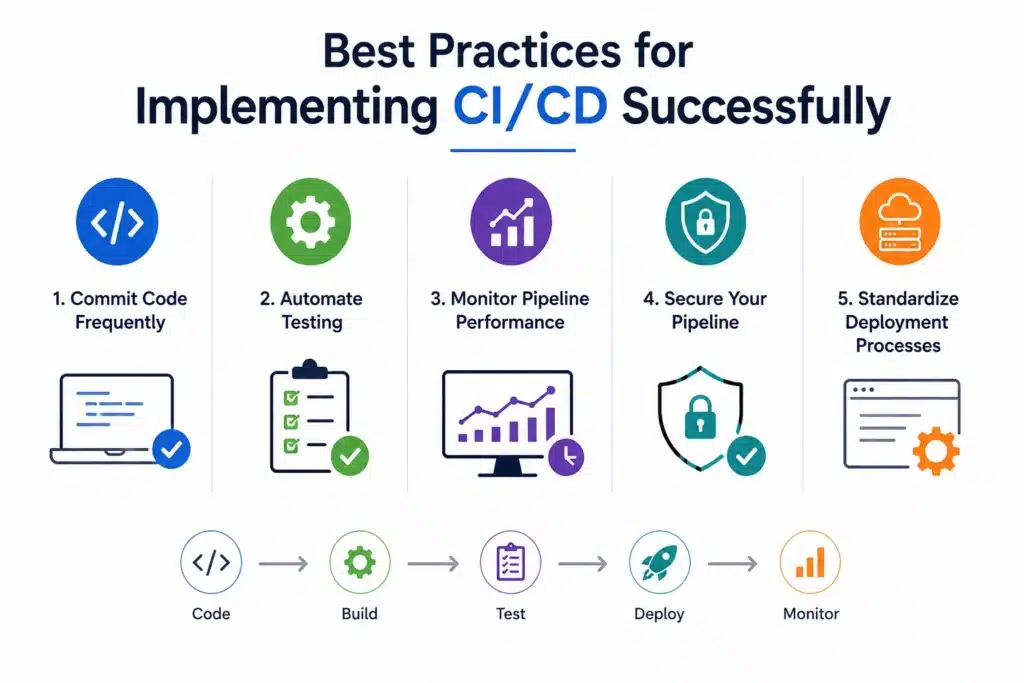
Choosing the right CI/CD tool is the only step. To maximize its value, organizations should follow proven best practices that improve software quality, deployment reliability, and team collaboration.
Commit Code Frequently
Encourage developers to commit smaller code changes regularly. Frequent commits reduce merge conflicts and allow issues to be identified much earlier.
Automate Testing
Integrate unit testing, integration testing, regression testing, and security testing into every stage of the CI/CD pipeline to detect defects before deployment.
Monitor Pipeline Performance
Track build times, deployment success rates, failed builds, and pipeline bottlenecks to continuously improve delivery performance.
Secure Your Pipeline
Implement role-based access controls, manage secrets securely, and include automated vulnerability scanning to strengthen your DevSecOps strategy.
Standardize Deployment Processes
Use Infrastructure as Code (IaC) and reusable deployment templates to ensure consistency across development, testing, and production environments.
Organizations looking to strengthen automation should also explore DevOps Automation Best Practices and Strategies.
Why Choose MicroGenesis for CI/CD and DevOps Transformation?
Implementing CI/CD successfully involves more than selecting the right tools—it requires a well-defined strategy, seamless integration, and continuous optimization to maximize business value.
MicroGenesis helps organizations modernize their software delivery processes by designing, implementing, and optimizing scalable DevOps and CI/CD pipelines tailored to their unique business and technology requirements. With extensive experience across the Atlassian ecosystem and modern DevOps practices, MicroGenesis enables teams to automate workflows, improve collaboration, and accelerate software delivery while maintaining security and governance.
Whether you’re adopting CI/CD for the first time, modernizing legacy development processes, or scaling enterprise DevOps initiatives, MicroGenesis provides the expertise to streamline implementation and reduce operational complexity. From repository management and pipeline automation to cloud integration and continuous improvement, the focus remains on helping organizations deliver software faster, more reliably, and with greater confidence.
By combining industry best practices with proven DevOps methodologies, MicroGenesis empowers businesses to build resilient, future-ready software delivery pipelines that support innovation and long-term digital transformation.
Conclusion
Modern software development demands speed, reliability, and continuous innovation. CI/CD tools play a critical role in helping organizations automate software delivery, improve collaboration, and maintain high-quality applications throughout the development lifecycle.
Platforms like Bitbucket, Bamboo, Bitbucket Pipelines, Jira Software, and Confluence each contribute to a connected DevOps ecosystem by simplifying code management, build automation, issue tracking, workflow automation, and knowledge sharing. Whether you’re starting your DevOps journey or enhancing an existing CI/CD pipeline, selecting the right combination of tools can significantly improve software delivery performance.
For businesses looking to scale automation and streamline deployments, investing in DevOps consulting services can help accelerate implementation, improve operational efficiency, and ensure long-term success.


