


Modern software development has shifted from monolithic applications running on dedicated servers to cloud-native, distributed systems that demand speed, scalability, and resilience. Organizations are expected to release new features rapidly, support millions of users, and maintain high availability across multiple cloud environments. Achieving these goals requires technologies that simplify application deployment while ensuring consistency across development, testing, and production.
This is where containerization and container orchestration have become fundamental pillars of modern DevOps.
Containerization packages applications along with their dependencies into lightweight, portable containers that run consistently across environments. Container orchestration platforms then automate the deployment, scaling, networking, and management of these containers, allowing teams to manage complex applications with minimal manual intervention.
Among the many tools available today, Docker has become the industry standard for creating and managing containers, while Kubernetes has emerged as the leading orchestration platform for running containerized workloads at scale. Although these technologies are often mentioned together, they solve different challenges and work best when used as complementary components of a cloud-native application platform.
Organizations building modern DevOps environments should first understand Containerization in Cloud and DevOps Environments to learn how containers improve software portability, scalability, and automation across hybrid and multi-cloud infrastructures.
In this guide, we’ll explore the fundamentals of containerization and orchestration, compare Docker and Kubernetes, explain how they work together, and help you determine which technology best fits your organization’s application delivery strategy.
Why Containerization Matters
Traditional application deployments often encountered challenges caused by differences between development, testing, and production environments.
Developers frequently heard statements like:
“It works perfectly on my machine.”
These inconsistencies typically resulted from:
- Missing libraries
- Different operating system versions
- Dependency conflicts
- Manual configuration errors
- Infrastructure inconsistencies
Containerization eliminates these issues by packaging everything an application needs—including code, runtime, libraries, dependencies, and configuration files—into a standardized container that behaves consistently regardless of where it’s deployed.
This portability enables organizations to accelerate software releases while improving reliability and reducing operational overhead.
What Is Containerization?
Containerization is a lightweight virtualization technology that packages an application and all its required dependencies into an isolated unit known as a container.
Unlike traditional virtual machines, containers share the host operating system kernel instead of running separate guest operating systems. This makes containers significantly smaller, faster to start, and more resource-efficient.
A container includes:
- Application code
- Runtime environment
- Libraries
- System tools
- Configuration files
- Required dependencies
Because everything travels together, applications behave consistently across laptops, on-premises servers, private clouds, and public cloud platforms.
Benefits of Containerization
Containerization has transformed modern software development by making applications more portable, scalable, and easier to manage.
Some of its key advantages include:
Consistent Environments
Containers ensure applications run identically across development, testing, staging, and production environments, minimizing deployment-related issues.
Improved Portability
Container images can run on virtually any infrastructure that supports a container runtime, making migrations between on-premises systems and cloud providers significantly easier.
Faster Deployments
Since containers package only the application and its dependencies, they start within seconds, enabling rapid deployments and faster release cycles.
Better Resource Utilization
Unlike virtual machines, containers share the host operating system kernel, reducing memory and CPU overhead while allowing higher application density on the same hardware.
Simplified Scalability
Applications can be scaled horizontally by launching additional container instances whenever demand increases.
Organizations implementing cloud-native DevOps strategies can also explore How Cloud Computing Enhances DevOps Practices to understand how cloud platforms improve scalability, automation, and infrastructure flexibility.
Containers vs Virtual Machines
Although containers and virtual machines both provide isolated environments, they operate very differently.
| Feature | Containers | Virtual Machines |
| Operating System | Share host OS kernel | Separate guest operating system |
| Startup Time | Seconds | Minutes |
| Resource Usage | Lightweight | Resource intensive |
| Portability | Very High | Moderate |
| Performance | Near-native | Slight virtualization overhead |
| Scalability | Excellent | Slower to scale |
| Primary Use | Cloud-native applications | Legacy workloads and complete OS isolation |
For organizations adopting DevOps and microservices, containers provide significantly greater flexibility and efficiency than traditional virtualization.
What Is Docker?
Docker is an open-source containerization platform that simplifies the process of building, packaging, distributing, and running containerized applications.
Before Docker, developers often struggled with dependency conflicts and inconsistent runtime environments. Docker standardized application packaging through portable container images, making software deployment predictable and repeatable.
Today, Docker remains one of the most widely adopted tools in modern software development and serves as the foundation for countless CI/CD pipelines.
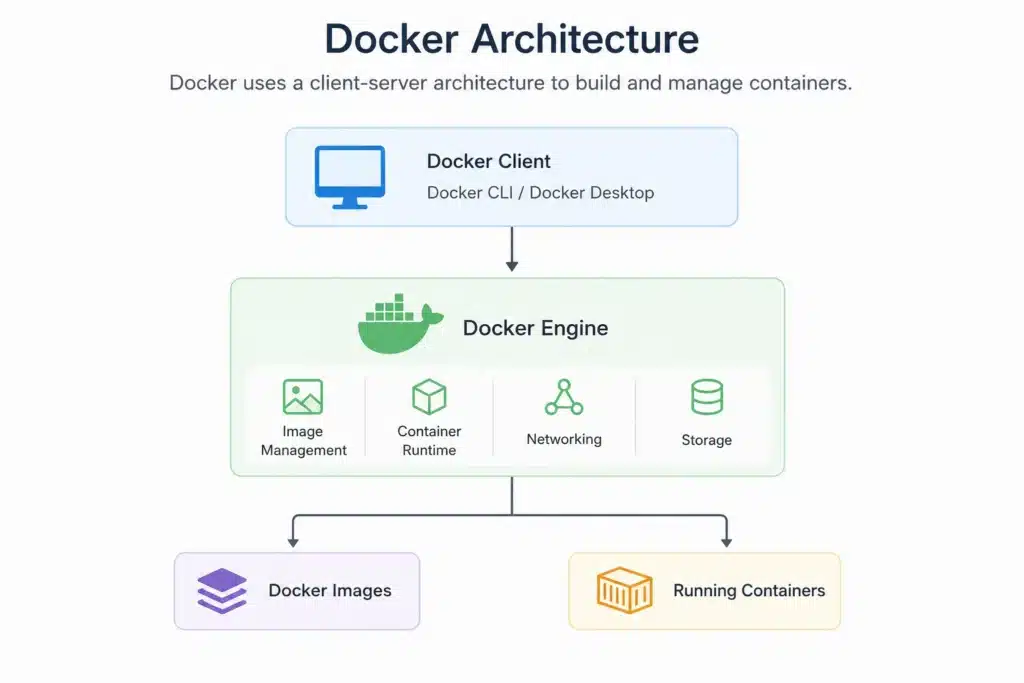
Docker Architecture
Key Docker Components
Understanding Docker’s core components makes it easier to build and manage containerized applications.
Docker Engine
The Docker Engine is the runtime responsible for building, managing, and executing containers.
It consists of:
- Docker Daemon
- REST API
- Docker CLI
Together, these components manage the complete container lifecycle.
Docker Image
A Docker image is a read-only template that contains everything required to run an application.
Images include:
- Application source code
- Runtime environment
- Libraries
- Dependencies
- Configuration
Every running container originates from an image.
Docker Container
A container is a running instance of a Docker image.
Containers are:
- Lightweight
- Isolated
- Portable
- Easily replaceable
- Fast to start and stop
Dockerfile
A Dockerfile is a text-based blueprint used to build Docker images.
It contains instructions such as:
- Base image selection
- Dependency installation
- File copying
- Environment variables
- Startup commands
Because Dockerfiles are version-controlled, they improve reproducibility across development teams.
Docker Hub
Docker Hub is Docker’s cloud-based container registry.
It allows organizations to:
- Store images
- Share images
- Version images
- Distribute applications securely
Private registries such as Azure Container Registry (ACR), Amazon Elastic Container Registry (ECR), and Google Artifact Registry are also widely used in enterprise environments.
Docker Compose
Docker Compose simplifies running multi-container applications using a single YAML configuration file.
Developers commonly use Docker Compose to launch complete development environments consisting of:
- Web servers
- Databases
- Caching services
- Background workers
- Message queues
with a single command.
Why Docker Has Become an Industry Standard
Docker significantly simplifies software development by standardizing how applications are packaged and delivered.
Its widespread adoption stems from several advantages:
- Faster application deployment
- Environment consistency
- Simplified dependency management
- Easy integration with CI/CD pipelines
- Improved collaboration between development and operations teams
- Strong ecosystem and community support
Organizations implementing automated software delivery should also explore DevOps Pipeline Guide to understand how Docker integrates into modern CI/CD workflows for faster and more reliable application deployments.
What Is Container Orchestration?
As organizations begin adopting containers, managing a handful of containerized applications is relatively straightforward. However, modern enterprises often run hundreds or even thousands of containers across multiple servers, cloud platforms, and geographic regions.
Managing these containers manually quickly becomes impractical.
Questions such as:
- Which server should run a new container?
- How do you automatically recover failed applications?
- How can traffic be balanced across multiple container instances?
- What happens when demand suddenly increases?
- How do updates happen without downtime?
These challenges are solved through container orchestration.
Container orchestration is the automated process of deploying, scheduling, networking, scaling, monitoring, and managing the lifecycle of containerized applications across clusters of servers.
Rather than requiring administrators to manually manage every container, orchestration platforms continuously monitor application health and automatically make adjustments to maintain availability and performance.
For organizations operating cloud-native applications, orchestration is no longer optional—it has become a core component of enterprise DevOps.
Why Container Orchestration Is Essential
Containerization solves application packaging.
Orchestration solves application management.
As applications grow into dozens or hundreds of microservices, organizations require automation to manage increasing operational complexity.
Container orchestration enables teams to:
Automate Deployments
Instead of manually launching containers, orchestration platforms automatically deploy applications based on predefined configurations.
Improve Availability
If a container crashes, the platform automatically replaces it without requiring administrator intervention.
Scale Applications Automatically
Traffic fluctuations are handled dynamically by increasing or decreasing container replicas based on CPU, memory, or custom metrics.
Simplify Networking
Applications running across multiple servers can communicate securely through built-in networking and service discovery.
Reduce Operational Overhead
Developers focus on building software while the orchestration platform manages infrastructure.
Popular Container Orchestration Tools
Several orchestration platforms are available today, each suited to different deployment scenarios.
| Platform | Best For |
| Kubernetes | Enterprise-scale cloud-native applications |
| Docker Swarm | Simple Docker-native orchestration |
| HashiCorp Nomad | Lightweight multi-workload scheduling |
| Apache Mesos | Large distributed infrastructure |
| Amazon ECS | AWS-native container management |
| Azure Kubernetes Service (AKS) | Managed Kubernetes on Azure |
| Google Kubernetes Engine (GKE) | Managed Kubernetes on Google Cloud |
Among these, Kubernetes has become the industry standard because of its flexibility, scalability, and broad ecosystem.
Organizations planning cloud modernization initiatives should also explore Migrating to the Cloud with DevOps: A Step-by-Step Guide to understand how Kubernetes and automation accelerate cloud adoption.
What Is Kubernetes?
Kubernetes (commonly abbreviated as K8s) is an open-source container orchestration platform originally developed by Google and now maintained by the Cloud Native Computing Foundation (CNCF).
Its primary purpose is to automate the deployment, scaling, networking, and management of containerized applications.
Instead of manually managing individual containers, Kubernetes manages entire clusters, ensuring applications remain available even when servers fail or workloads fluctuate.
Today, Kubernetes powers many of the world’s largest cloud-native platforms, including applications operated by financial institutions, healthcare providers, retailers, SaaS companies, and global technology enterprises.
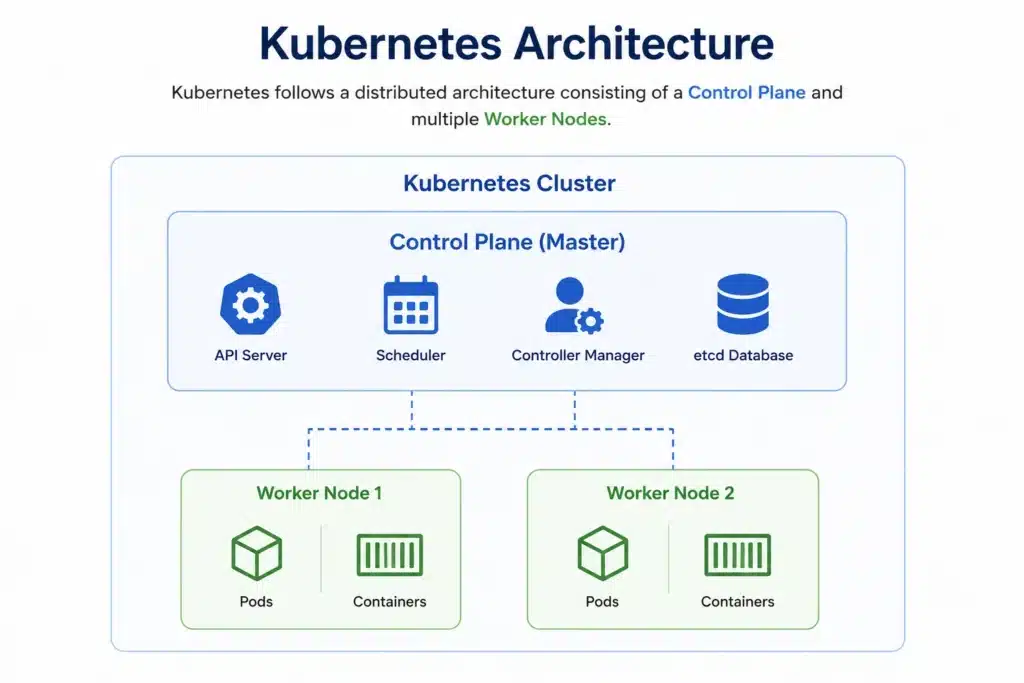
Kubernetes Architecture
Core Kubernetes Components
Understanding Kubernetes becomes much easier when you know the responsibility of each component.
Control Plane
The Control Plane acts as the brain of the Kubernetes cluster.
It is responsible for:
- Scheduling workloads
- Monitoring cluster health
- Managing deployments
- Maintaining desired application state
Administrators interact with the Control Plane rather than individual servers.
Worker Nodes
Worker nodes are the servers where applications actually run.
Each node contains:
- Container runtime
- Kubelet
- Kube Proxy
- Running application pods
Clusters may contain anywhere from two worker nodes to thousands depending on workload requirements.
Pods
A Pod is the smallest deployable object in Kubernetes.
A pod typically contains:
- One application container
- Shared networking
- Shared storage
- Shared configuration
Containers within the same pod communicate efficiently because they share resources.
Deployments
Deployments define how applications should run.
They manage:
- Desired number of replicas
- Rolling updates
- Rollbacks
- Self-healing behavior
Instead of launching containers manually, administrators update deployment definitions.
Services
Pods are temporary.
Their IP addresses change whenever they’re recreated.
Services provide a permanent network endpoint so applications can always communicate regardless of where pods are running.
ConfigMaps and Secrets
Applications require configuration.
Kubernetes separates application configuration from application code.
- ConfigMaps store configuration values.
- Secrets securely store passwords, API keys, certificates, and credentials.
This improves both security and operational flexibility.
Key Features of Kubernetes
Kubernetes has become the preferred orchestration platform because it automates many operational tasks that previously required manual effort.
Its most valuable capabilities include:
Automated Scheduling
Kubernetes automatically determines the best server for each workload based on available resources and scheduling policies.
Self-Healing
If a container crashes or a node becomes unavailable, Kubernetes automatically creates replacement containers without affecting application availability.
Horizontal Auto Scaling
Applications automatically scale up or down based on CPU utilization, memory usage, or custom business metrics.
This enables organizations to handle traffic spikes efficiently while controlling infrastructure costs.
Load Balancing
Traffic is automatically distributed across healthy application instances, improving reliability and user experience.
Rolling Updates
Application updates are deployed gradually without downtime.
If problems occur, Kubernetes automatically rolls back to the previous stable version.
Declarative Configuration
Instead of manually configuring infrastructure, administrators describe the desired state using YAML files.
Kubernetes continuously works to maintain that desired state.
Docker vs Kubernetes: What’s the Difference?
Docker and Kubernetes are often confused because they frequently work together.
However, they solve entirely different problems.
| Feature | Docker | Kubernetes |
| Primary Purpose | Build and run containers | Manage containers at scale |
| Focus | Containerization | Orchestration |
| Deployment Scope | Single host or small environments | Multi-node clusters |
| Scaling | Manual or Docker Swarm | Automatic |
| Self-Healing | Limited | Built-in |
| Load Balancing | Basic | Advanced |
| Rolling Updates | Manual | Automated |
| High Availability | Limited | Enterprise-grade |
A simple way to think about it is:
- Docker creates the containers.
- Kubernetes manages thousands of containers.
When Should You Use Docker?
Docker is an excellent choice when:
- Building containerized applications
- Local development
- CI/CD pipelines
- Small deployments
- Learning containers
- Running standalone services
Docker remains the foundation of nearly every Kubernetes deployment.
When Should You Use Kubernetes?
Kubernetes becomes the better choice when your applications require:
- High availability
- Automatic scaling
- Multi-node deployments
- Self-healing infrastructure
- Enterprise-grade orchestration
- Hybrid or multi-cloud deployments
- Large microservices architectures
Organizations scaling DevOps across multiple environments should also explore CI/CD Tools for Your DevOps Team to understand how Kubernetes integrates with modern automation pipelines.
How Docker and Kubernetes Work Together
Although Docker and Kubernetes are often compared, they are not competing technologies. In fact, they complement each other to create a complete platform for developing, deploying, and managing modern applications.
Docker focuses on building and packaging applications into containers, while Kubernetes focuses on deploying, orchestrating, scaling, and managing those containers across clusters of servers.
Think of Docker as the tool that prepares the application for deployment, and Kubernetes as the platform that keeps the application running reliably in production.
This combination has become the foundation of modern cloud-native architectures, enabling organizations to deliver software faster while maintaining high availability and operational efficiency.
Docker and Kubernetes Workflow
A typical deployment workflow looks like this:
Developer Writes Code
│
▼
Create Dockerfile
│
▼
Build Docker Image
│
▼
Push Image to Registry
(Docker Hub / Azure ACR / AWS ECR)
│
▼
Kubernetes Pulls Image
│
▼
Creates Pods
│
▼
Deploys Application
│
▼
Monitors Health
│
▼
Auto Scales & Self-Heals
This automated workflow eliminates manual deployment tasks while improving consistency and reliability throughout the software delivery lifecycle.
Real-World Use Cases
Docker and Kubernetes power some of the world’s largest cloud-native applications. Their flexibility makes them suitable for organizations of all sizes across multiple industries.
SaaS Platforms
Software-as-a-Service providers use Docker and Kubernetes to deploy hundreds of microservices independently, allowing teams to release new features quickly without affecting the entire application.
Examples include:
- CRM platforms
- HR applications
- Project management tools
- Collaboration software
Banking and Financial Services
Financial institutions require secure, highly available infrastructure capable of handling millions of daily transactions.
Kubernetes enables banks to:
- Scale applications during peak transaction periods
- Maintain regulatory compliance
- Improve disaster recovery
- Reduce downtime during software updates
Healthcare
Healthcare organizations use container platforms to deploy electronic medical record systems, patient portals, and AI-powered diagnostic applications.
Benefits include:
- High availability
- Secure application isolation
- Faster software updates
- Easier compliance management
Retail and E-Commerce
Online retailers experience dramatic traffic fluctuations during shopping festivals and seasonal campaigns.
Container orchestration allows retailers to:
- Automatically scale applications during peak demand
- Maintain website responsiveness
- Reduce infrastructure costs during low traffic periods
- Improve customer experience
Manufacturing and IoT
Manufacturing organizations deploy containerized applications for:
- Factory automation
- Predictive maintenance
- Industrial IoT platforms
- Edge computing
- Supply chain management
Containers make it easier to deploy identical software across factories located around the world.
Challenges of Using Docker and Kubernetes
While container platforms offer tremendous advantages, organizations should also understand the operational challenges associated with large-scale container adoption.
1. Security Risks
Containers share the host operating system kernel, making security an essential consideration.
Common challenges include:
- Vulnerable container images
- Misconfigured permissions
- Exposed secrets
- Insecure registries
Best Practices
- Scan images before deployment.
- Use trusted base images.
- Implement Role-Based Access Control (RBAC).
- Store secrets securely using Kubernetes Secrets or external vaults.
- Keep container images updated.
2. Networking Complexity
As applications grow into dozens of microservices, managing communication between containers becomes increasingly complex.
Challenges include:
- Service discovery
- Load balancing
- DNS management
- Network policies
Modern Kubernetes networking solutions simplify communication while improving security and performance.
3. Persistent Storage
Containers are designed to be ephemeral, meaning they can be created or destroyed at any time.
Applications such as databases require persistent storage that survives container restarts.
Organizations should use:
- Persistent Volumes
- Storage Classes
- Cloud-native storage services
to ensure data durability.
4. Monitoring and Observability
Running hundreds of containers generates enormous volumes of logs, metrics, and events.
Without centralized monitoring, troubleshooting becomes difficult.
Organizations should implement observability platforms capable of collecting:
- Logs
- Metrics
- Distributed traces
- Performance analytics
to maintain application health and quickly resolve issues.
5. Operational Complexity
While Docker is relatively straightforward, Kubernetes introduces additional complexity.
Teams must understand concepts such as:
- Pods
- Deployments
- Services
- Ingress
- Namespaces
- ConfigMaps
- Secrets
- RBAC
Organizations often adopt managed Kubernetes services or partner with experienced DevOps consultants to accelerate implementation and reduce operational overhead.
Teams planning Kubernetes adoption should also explore Challenges in Cloud and DevOps Integration and How to Solve Them to better understand common implementation obstacles and proven mitigation strategies.
Best Practices for Docker and Kubernetes
Successful container adoption requires more than simply deploying applications. Following industry best practices helps improve security, performance, and maintainability.
Build Small Container Images
Smaller images:
- Deploy faster
- Consume less storage
- Reduce attack surface
- Improve startup times
Use multi-stage builds to eliminate unnecessary dependencies.
Version Everything
Version-control:
- Dockerfiles
- Kubernetes manifests
- Helm charts
- Infrastructure as Code
This ensures reproducible deployments and simplifies rollbacks.
Automate CI/CD Pipelines
Integrate Docker and Kubernetes into automated CI/CD pipelines to:
- Build images
- Run automated tests
- Scan for vulnerabilities
- Deploy applications
- Validate releases
Automation reduces manual effort and improves deployment consistency.
Implement Continuous Monitoring
Monitor both infrastructure and application performance using modern observability tools.
Track:
- CPU utilization
- Memory consumption
- Response times
- Error rates
- Container health
- Cluster capacity
Proactive monitoring helps identify issues before they impact end users.
Secure the Entire Supply Chain
Container security should extend across the complete software delivery pipeline.
This includes:
- Image scanning
- Runtime protection
- Secret management
- Least-privilege access
- Compliance monitoring
- Policy enforcement
Security should be integrated into CI/CD pipelines rather than added after deployment.
The Future of Container Platforms
Container technology continues to evolve alongside cloud-native development and artificial intelligence.
Some emerging trends include:
- AI-assisted Kubernetes operations for predictive scaling and automated troubleshooting.
- GitOps to manage infrastructure and deployments using Git as the single source of truth.
- Platform Engineering that provides standardized developer platforms built on Kubernetes.
- Serverless containers that combine container flexibility with serverless simplicity.
- Edge computing for deploying containerized workloads closer to users and connected devices.
- eBPF-powered observability for deeper visibility into container networking and application performance.
As these technologies mature, organizations will be able to automate even more operational tasks while improving scalability, resilience, and developer productivity.
Why Choose MicroGenesis for Docker and Kubernetes Implementation?
Successfully adopting Docker and Kubernetes requires more than deploying containers. Organizations need a well-defined cloud-native strategy, secure container platforms, automated CI/CD pipelines, observability, governance, and ongoing optimization to achieve long-term success.
MicroGenesis helps enterprises modernize application delivery through comprehensive DevOps consulting, Docker implementation, Kubernetes deployment, cloud migration, Infrastructure as Code (IaC), DevSecOps, and managed container platforms. Our experts design scalable, secure, and highly available container ecosystems that accelerate software delivery while reducing operational complexity and infrastructure costs.
Whether you’re modernizing legacy applications, adopting microservices, or building cloud-native platforms, MicroGenesis provides DevOps consulting services with the expertise needed to streamline your DevOps transformation and maximize the value of container technologies.
Organizations looking to further automate container deployments can also explore DevOps Automation: Best Practices and Strategies to learn how automation improves software quality, deployment speed, and operational efficiency.
Conclusion
Containerization and orchestration have fundamentally changed how modern applications are built, deployed, and managed. Docker simplifies packaging applications into portable, lightweight containers, while Kubernetes automates their deployment, scaling, networking, and lifecycle management across complex infrastructures.
Rather than choosing between Docker and Kubernetes, organizations should view them as complementary technologies that together enable faster software delivery, greater scalability, and improved operational resilience. When integrated into modern DevOps workflows, they empower development teams to release applications with greater confidence while reducing manual effort and infrastructure complexity.
As businesses continue their cloud-native transformation, adopting Docker and Kubernetes is no longer just a technical upgrade—it is a strategic investment in agility, innovation, and long-term competitiveness. With MicroGenesis as your trusted DevOps partner, you can successfully implement secure, scalable container platforms that accelerate digital transformation and help your organization deliver reliable applications at enterprise scale.


