


Modern software development demands speed, agility, and reliability. Organizations are expected to release new features rapidly, respond to changing customer needs, and maintain secure, high-performing applications—all while reducing operational costs. Achieving these goals with manual processes is becoming increasingly difficult.
This is where DevOps automation plays a transformative role. By automating repetitive tasks across the Software Development Life Cycle (SDLC), organizations can accelerate software delivery, improve collaboration, minimize human error, and ensure consistent deployments.
From continuous integration and automated testing to infrastructure provisioning and real-time monitoring, DevOps automation enables development and operations teams to focus on innovation instead of repetitive operational work.
Whether you’re beginning your DevOps journey or looking to optimize an existing automation strategy, implementing the right practices can significantly improve productivity, software quality, and business agility.
Organizations aiming to build scalable automation frameworks often start by understanding DevOps lifecycle phases, ensuring automation is integrated across every stage of software development.
What Is DevOps Automation?
DevOps automation is the practice of using software tools, scripts, and predefined workflows to automate repetitive tasks throughout the software development lifecycle. Instead of relying on manual processes for building, testing, deploying, configuring infrastructure, or monitoring applications, organizations use automation to create faster, more reliable, and repeatable workflows.
Automation enables teams to:
- Build applications automatically
- Execute continuous testing
- Deploy applications with minimal manual intervention
- Provision infrastructure consistently
- Monitor application performance in real time
- Improve collaboration across development, operations, and security teams
Rather than replacing developers or operations engineers, DevOps automation eliminates repetitive tasks so teams can focus on innovation, problem-solving, and delivering business value.
Modern organizations also combine automation with DevOps workflows to create standardized software delivery processes that improve collaboration and reduce deployment bottlenecks.
Why DevOps Automation Matters
As organizations adopt cloud-native applications, microservices, containers, and distributed development teams, software delivery has become increasingly complex. Manual deployments and isolated workflows can slow releases, increase errors, and make it difficult to scale operations.
DevOps automation addresses these challenges by creating standardized, repeatable processes that improve speed, reliability, and collaboration across teams.
Some of the key reasons why DevOps automation has become essential include:
- Faster software delivery
- Reduced operational complexity
- Consistent deployment processes
- Improved software quality
- Enhanced collaboration across teams
- Better scalability
- Stronger security integration
- Faster recovery from production incidents
Businesses implementing enterprise DevOps practices often strengthen their automation initiatives through DevOps implementation roadmaps, ensuring technology, people, and processes evolve together.
Key Benefits of DevOps Automation
Automation delivers measurable improvements across every stage of software development. Beyond improving efficiency, it enables organizations to innovate faster while maintaining reliability and compliance.
1. Accelerated Software Delivery
Automated pipelines reduce the time required to build, test, and deploy applications. Continuous integration and automated deployments allow development teams to release software more frequently without sacrificing quality.
Faster delivery enables organizations to respond quickly to customer feedback, changing business requirements, and competitive market conditions.
2. Improved Software Quality
Automation helps detect defects early through continuous testing, code validation, and quality checks. Every code change passes through standardized validation processes before reaching production, reducing the likelihood of critical issues after deployment.
Organizations focused on improving software quality should also adopt modern quality assurance strategies alongside DevOps automation.
3. Consistent and Reliable Deployments
Manual deployments often introduce inconsistencies between environments. Automation ensures that every deployment follows the same validated process, significantly reducing configuration errors and improving release reliability.
Benefits include:
- Reduced deployment failures
- Faster rollback capabilities
- Standardized release processes
- Improved environment consistency
4. Enhanced Collaboration
DevOps automation creates a shared workflow where developers, operations teams, QA engineers, and security professionals work together using common pipelines and automated processes.
Improved collaboration reduces communication gaps while accelerating issue resolution and software delivery.
5. Improved Security
Security is no longer treated as a separate phase at the end of development. Modern DevOps automation integrates vulnerability scanning, dependency management, compliance validation, and secrets management directly into development pipelines.
Organizations implementing secure automation practices increasingly adopt DevSecOps to embed security throughout the software development lifecycle.
6. Better Scalability
As applications and development teams grow, manual processes become increasingly difficult to manage. Automation enables organizations to scale software delivery without proportionally increasing operational overhead.
Cloud-native automation platforms support:
- Dynamic infrastructure provisioning
- Auto-scaling
- Container orchestration
- Infrastructure as Code
- Hybrid and multi-cloud deployments
7. Continuous Monitoring and Faster Feedback
Automation doesn’t stop after deployment. Continuous monitoring provides real-time insights into application health, infrastructure performance, and user experience.
Development teams receive immediate feedback, enabling them to resolve issues proactively before they impact customers.
Organizations implementing automation across cloud environments should also understand optimizing IT operations in hybrid and multi-cloud environments to improve visibility, resilience, and operational efficiency.
DevOps Automation at a Glance
| Area | Manual Process | Automated DevOps |
| Code Integration | Manual merges | Continuous Integration |
| Testing | Manual execution | Automated testing pipelines |
| Deployment | Manual releases | Continuous Deployment |
| Infrastructure | Manual configuration | Infrastructure as Code |
| Monitoring | Reactive troubleshooting | Real-time monitoring and alerts |
| Security | End-of-cycle testing | Integrated DevSecOps |
Automation transforms software delivery from a reactive process into a proactive, scalable, and continuously improving workflow.
Core Components of DevOps Automation
A successful DevOps automation strategy relies on multiple interconnected components working together to streamline software delivery. Rather than automating isolated tasks, organizations should build an end-to-end automation pipeline that spans development, testing, deployment, infrastructure management, and monitoring.
Below are the essential building blocks of a modern DevOps automation framework.
1. Continuous Integration (CI)
Continuous Integration (CI) automates the process of integrating code changes into a shared repository. Every code commit automatically triggers a series of validation steps, including compiling the application, running automated tests, and checking code quality before the changes are merged.
By identifying integration issues early, CI helps development teams maintain a stable codebase and reduce delays caused by manual testing or late-stage bug fixes.
Benefits of Continuous Integration
- Detects bugs early in development
- Reduces merge conflicts
- Improves collaboration between developers
- Speeds up software delivery
- Maintains consistent code quality
Organizations planning to build scalable automation pipelines should first understand Continuous Integration and Continuous Deployment (CI/CD) and how these practices form the foundation of modern DevOps.
2. Continuous Delivery and Continuous Deployment (CD)
Once code has been successfully integrated and tested, Continuous Delivery (CD) automates the release process by preparing applications for deployment. Continuous Deployment extends this capability by automatically releasing validated code to production environments without manual intervention.
Modern deployment pipelines enable organizations to release software multiple times a day while maintaining high levels of reliability and consistency.
Benefits of Continuous Delivery
- Faster software releases
- Reduced deployment risks
- Improved release consistency
- Automated rollback capabilities
- Better customer experience
Organizations looking to improve release efficiency should continuously evaluate their CI/CD tools to ensure they support scalable automation and enterprise-grade deployment workflows.
3. Infrastructure as Code (IaC)
Managing infrastructure manually is time-consuming and prone to configuration errors. Infrastructure as Code (IaC) solves this challenge by allowing infrastructure to be defined, provisioned, and managed using code.
Using tools such as Terraform, AWS CloudFormation, Azure Resource Manager, or Ansible, organizations can create repeatable infrastructure deployments across development, testing, and production environments.
Benefits of IaC
- Faster infrastructure provisioning
- Consistent environments
- Improved disaster recovery
- Version-controlled infrastructure
- Reduced configuration drift
IaC also supports cloud scalability by allowing infrastructure changes to be deployed automatically whenever application requirements evolve.
4. Automated Testing
Testing is one of the most valuable areas for automation because it helps detect defects before software reaches production.
Rather than relying solely on manual quality assurance, DevOps automation integrates testing throughout the development lifecycle.
Common automated testing includes:
- Unit Testing
- Integration Testing
- Functional Testing
- Regression Testing
- Performance Testing
- Security Testing
By running automated tests after every code change, organizations improve software quality while reducing release delays.
Businesses aiming to strengthen testing maturity can also explore testing strategies and quality assurance best practices to complement automated testing within DevOps pipelines.
5. Continuous Monitoring
Automation doesn’t stop after deployment. Continuous monitoring ensures applications remain healthy, secure, and performant throughout their lifecycle.
Monitoring solutions collect real-time metrics from applications, infrastructure, containers, databases, and cloud environments.
Key monitoring capabilities include:
- Application performance monitoring
- Infrastructure monitoring
- Log management
- Alerting and notifications
- User experience monitoring
Continuous monitoring enables development teams to identify issues before users are affected while providing valuable feedback for future software improvements.
6. Configuration Management
Configuration management helps maintain consistency across servers, applications, and environments by automating system configuration.
Tools like Ansible, Puppet, and Chef ensure that infrastructure remains standardized regardless of where applications are deployed.
Benefits include:
- Reduced manual configuration
- Improved compliance
- Consistent environments
- Faster environment provisioning
- Easier system maintenance
Configuration management becomes increasingly important as organizations scale cloud-native and hybrid infrastructures.
7. Containerization and Orchestration
Container technologies have transformed modern software deployment by packaging applications and their dependencies into portable environments that run consistently across different platforms.
Container orchestration platforms such as Kubernetes automate deployment, scaling, networking, and recovery of containerized applications.
Key advantages include:
- Faster application deployment
- Simplified scaling
- High availability
- Self-healing infrastructure
- Efficient resource utilization
Organizations adopting cloud-native architectures should understand serverless architectures and DevOps as the next evolution of automated software delivery alongside containers.
Selecting the Right DevOps Automation Tools
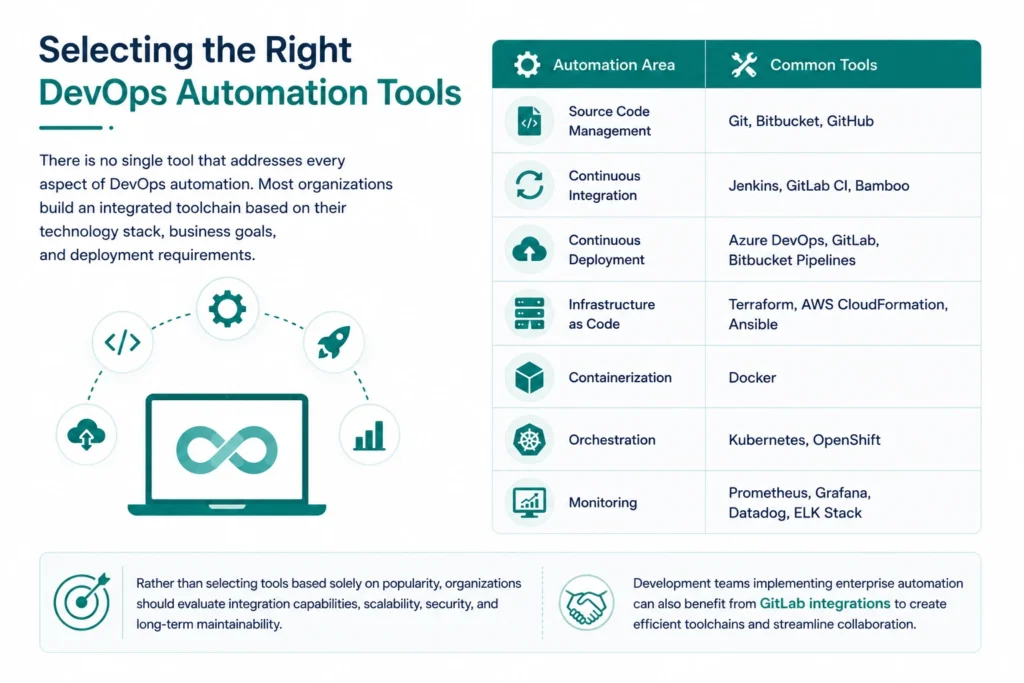
There is no single tool that addresses every aspect of DevOps automation. Most organizations build an integrated toolchain based on their technology stack, business goals, and deployment requirements.
| Automation Area | Common Tools |
| Source Code Management | Git, Bitbucket, GitHub |
| Continuous Integration | Jenkins, GitLab CI, Bamboo |
| Continuous Deployment | Azure DevOps, GitLab, Bitbucket Pipelines |
| Infrastructure as Code | Terraform, AWS CloudFormation, Ansible |
| Containerization | Docker |
| Orchestration | Kubernetes, OpenShift |
| Monitoring | Prometheus, Grafana, Datadog, ELK Stack |
Rather than selecting tools based solely on popularity, organizations should evaluate integration capabilities, scalability, security, and long-term maintainability.
Development teams implementing enterprise automation can also benefit from GitLab integrations to create efficient toolchains and streamline collaboration across the software delivery lifecycle.
Strategies for Successful DevOps Automation Implementation
Implementing DevOps automation is not simply about deploying automation tools—it requires a structured approach that aligns technology, processes, and people. Organizations that plan their automation journey carefully are more likely to achieve faster software delivery, improved collaboration, and long-term operational efficiency.
Here are the key strategies for implementing DevOps automation successfully.
1. Define Clear Automation Goals
Before investing in automation tools, identify the areas where automation will deliver the greatest business value.
Common objectives include:
- Reducing deployment time
- Increasing release frequency
- Improving software quality
- Enhancing infrastructure scalability
- Strengthening security and compliance
- Minimizing manual intervention
Establishing measurable KPIs such as deployment frequency, lead time for changes, and Mean Time to Recovery (MTTR) helps track the success of your automation initiatives.
2. Choose the Right Automation Tools
Selecting the right toolchain is critical for building an efficient DevOps ecosystem.
Instead of choosing tools based solely on popularity, evaluate them based on:
- Integration capabilities
- Scalability
- Ease of adoption
- Security features
- Cloud compatibility
- Enterprise support
Organizations implementing enterprise DevOps should also evaluate GitLab Enterprise for scaling DevOps architecture to understand how integrated platforms simplify automation across large development teams.
3. Start Small and Scale Gradually
Attempting to automate every process simultaneously often creates unnecessary complexity.
Instead:
- Automate one application or team first.
- Validate workflows.
- Measure performance.
- Gather feedback.
- Expand automation across other projects.
This phased approach minimizes disruption while improving adoption across the organization.
4. Encourage Cross-Functional Collaboration
Successful DevOps automation depends on strong collaboration between developers, operations teams, QA engineers, and security specialists.
Organizations should encourage:
- Shared ownership
- Open communication
- Collaborative planning
- Knowledge sharing
- Continuous feedback
Automation should support collaboration—not replace it.
5. Standardize Development Processes
Standardized workflows reduce inconsistencies across projects and simplify onboarding for new team members.
Organizations should establish:
- Coding standards
- Branching strategies
- Deployment templates
- Testing guidelines
- Infrastructure standards
Standardization improves pipeline reliability while making automation easier to maintain.
6. Measure Performance Continuously
Automation should evolve alongside business requirements.
Monitor metrics such as:
- Deployment frequency
- Build success rate
- Pipeline duration
- Failed deployments
- MTTR
- Infrastructure utilization
Continuous measurement helps identify bottlenecks and opportunities for optimization.
Common Challenges in DevOps Automation
Although DevOps automation delivers significant benefits, organizations often encounter challenges during implementation.
Understanding these challenges helps teams prepare effective mitigation strategies.
Resistance to Change
One of the biggest obstacles is cultural rather than technical.
Development and operations teams accustomed to manual processes may initially hesitate to adopt automated workflows.
Organizations can improve adoption through:
- Training programs
- Internal workshops
- Pilot implementations
- Executive sponsorship
- Clear communication of business benefits
Managing Multiple Tools
As organizations adopt new technologies, their DevOps toolchain can become increasingly fragmented.
Disconnected tools often lead to:
- Duplicate work
- Data silos
- Higher maintenance costs
- Reduced visibility
Businesses can simplify automation by building integrated workflows and adopting platforms that support seamless collaboration.
Organizations interested in connected development environments can explore Atlassian tools to streamline software delivery.
Security and Compliance
Automation increases deployment speed, but security should never become an afterthought.
Modern DevOps organizations integrate:
- Static code analysis
- Vulnerability scanning
- Compliance validation
- Secrets management
- Dependency scanning
Embedding security throughout the development lifecycle enables organizations to release software confidently while maintaining regulatory compliance.
Teams building secure delivery pipelines should also understand securing your software supply chain with GitLab.
Managing Cloud Complexity
As organizations expand across hybrid and multi-cloud environments, managing infrastructure manually becomes increasingly difficult.
Automation helps simplify:
- Infrastructure provisioning
- Resource scaling
- Environment consistency
- Cloud governance
- Disaster recovery
A cloud-first automation strategy enables organizations to respond more quickly to changing business requirements.
Best Practices for DevOps Automation
Organizations that achieve the greatest success with DevOps automation consistently follow these best practices.
Shift Security Left
Integrate security testing early in the software development lifecycle rather than waiting until deployment.
Automate Everything Possible
Identify repetitive manual tasks across development, testing, infrastructure, monitoring, and deployments that can be automated safely.
Use Infrastructure as Code
Maintain version-controlled infrastructure to ensure consistency and repeatability across all deployment environments.
Build Reusable Pipelines
Create standardized automation templates that can be reused across multiple projects, reducing maintenance effort and improving consistency.
Monitor Continuously
Collect performance metrics from applications, infrastructure, and deployment pipelines to support continuous optimization.
Invest in Team Enablement
Automation is most effective when supported by skilled teams that understand both DevOps practices and business objectives.
Future of DevOps Automation
DevOps automation continues to evolve rapidly as organizations embrace AI, cloud-native technologies, and intelligent software delivery.
Some of the trends shaping the future include:
- AI-assisted software delivery
- Intelligent pipeline optimization
- Platform Engineering
- GitOps workflows
- Policy-as-Code
- Self-healing infrastructure
- Predictive monitoring
- Autonomous testing
Organizations adopting these technologies will improve software quality while reducing operational complexity.
Businesses preparing for next-generation software delivery should also explore Artificial Intelligence for IT Operations (AIOps) to understand how AI enhances operational efficiency and incident management.
Why Choose MicroGenesis for DevOps Automation?
Successful DevOps automation requires more than implementing tools—it demands a strategic partner who understands how to align automation with business goals.
MicroGenesis helps organizations modernize software delivery by designing scalable DevOps consulting services automation strategies tailored to their technology landscape. From CI/CD implementation and cloud automation to Infrastructure as Code, DevSecOps, and enterprise DevOps transformation, our experts help organizations build reliable, secure, and future-ready software delivery pipelines.
Our approach focuses on:
- End-to-end DevOps consulting
- CI/CD implementation
- Automation strategy
- Cloud-native modernization
- DevSecOps integration
- Continuous optimization
- Enterprise-scale automation
By combining industry’s best practices with deep technical expertise, MicroGenesis enables organizations to accelerate innovation while maintaining software quality, security, and operational excellence.
Wrapping up
DevOps automation has become a strategic necessity for organizations aiming to deliver software faster, improve quality, and respond quickly to changing business demands. By automating key processes such as continuous integration, continuous deployment (CI/CD), infrastructure provisioning, testing, security, and monitoring, businesses can reduce manual effort, eliminate deployment bottlenecks, and build more reliable software delivery pipelines.
However, successful DevOps automation goes beyond implementing tools. It requires a well-defined strategy, standardized workflows, cross-functional collaboration, and a culture of continuous improvement. Organizations that invest in automation today are better positioned to scale efficiently, strengthen security, accelerate innovation, and maintain a competitive advantage in an increasingly digital world.
At MicroGenesis, we help organizations transform their software delivery lifecycle with tailored DevOps automation solutions that align technology with business objectives. From CI/CD implementation and Infrastructure as Code (IaC) to DevSecOps, cloud-native modernization, and enterprise DevOps consulting services in India, our experts enable businesses to build secure, scalable, and future-ready automation frameworks.
Whether you’re beginning your automation journey or optimizing an existing DevOps ecosystem, partnering with MicroGenesis empowers your teams to deliver software with greater speed, consistency, and confidence while driving long-term business growth.


