


In the fast-paced world of managing projects, it’s important for teams to use tools like Jira Software well to get things done efficiently.
Issues in Jira are made up of fields that store various pieces of information. Every issue comes with default system fields, like name or description, but you’ll most likely need to add more fields to collect information that is very specific to your company. That’s where custom fields come in—they can collect any info you need them to collect and be displayed in different configurations in your issues.
Custom fields are always optional fields. This means that you can create a new custom field without making changes to existing issues. The existing issues will contain no value for the new custom field, even if a default value is defined for it.
Defining issue types, fields and Workflows.
How does JIRA Software present and store information? There are three main areas to explore: issue types, fields, and workflows.
Issue types: issue types are entities that mirror real world objects. Software teams will often use issue types like bug, task, and user story.
Fields: fields track attributes surrounding each issue type. Bugs usually have fields like summary, description, fix version, and component to describe the area of software where the bug surfaces.
Workflow: workflow is the lifecycle of the object represented by the issue type. Bugs are found, reviewed, fixed, verified, and closed by several members of the team.

Identifying Field Overload:
In many JIRA Software instances when the team asks for too much information from its user base. When someone requests a field, they tend to not realize that their field has a cost. Every time a new field is added into JIRA Software, it becomes harder for users to create issues. No one likes to see a giant form with lots of cryptic terms in it. How do you know if you’re struggling from field overload? Let’s center around three important questions:
- Are engineers neglecting to fill out all of the necessary information when creating issues?
- Do engineers not submit issues because it’s too much work?
- Are certain fields collecting bogus information because end users don’t understand them?
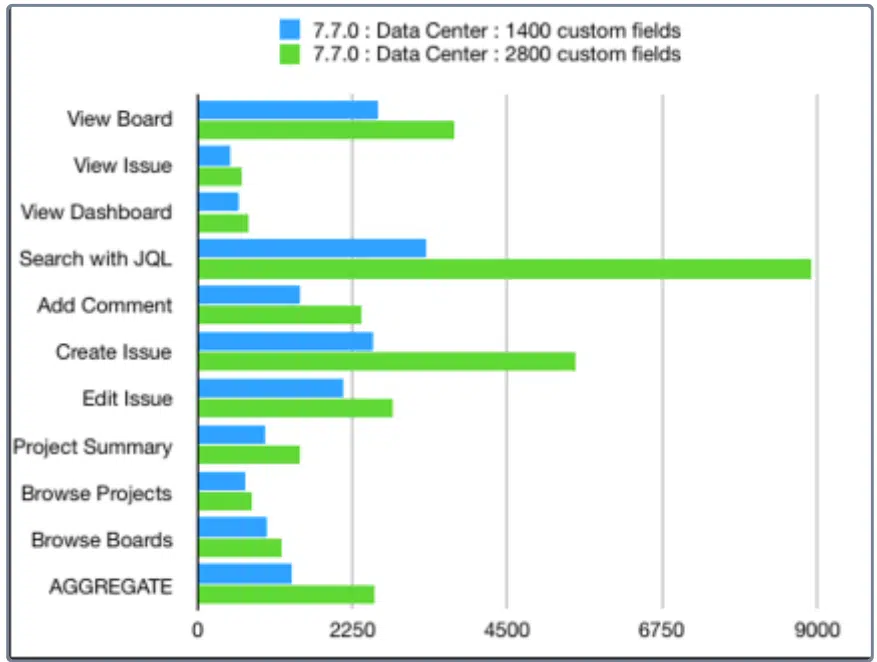
Average response times per action (Atlassian test results):
Average response times per action (in milliseconds): custom fields test
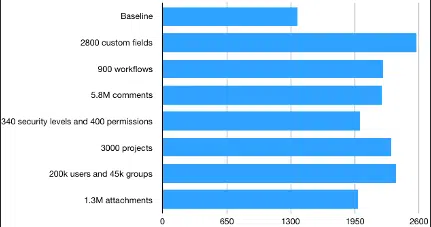
Aggregates of average response times (in milliseconds) for all actions: custom fields test
Optimizing Field Overload:
1. Ensure the field meaningfully impacts the business
Administrators, whenever someone requests adding a field in JIRA Software, it’s important to consider the following questions:
- What is the business value of this field? How does having this information significantly impact your job?
- What effort is required from the end user to provide this information? How much time does it take for a user to collect and submit the information accurately? Can we automate this process
- At what stage of the issue lifecycle is this information needed?
Each field comes with a cost. Users must:
- Understand the purpose of the field
- Input data
- Keep it updated as its relevance changes over time
For fields to be effective, they must be filled out accurately and contain up-to-date information. When the system becomes burdensome, users are less likely to provide quality data, leading to “field rot” where the data becomes unreliable. It’s crucial to ensure that each field is genuinely necessary.
2. Order fields on screens
By default, JIRA Software places new fields at the bottom of the screen. When administrators first construct a screen, all fields are arranged logically for that particular application. However, as teams require additional fields, it’s essential to carefully position them on the appropriate screen. This ensures an optimized data entry experience for end users. Each new field should contribute to guiding users towards completing their tasks efficiently. Let’s examine two examples:
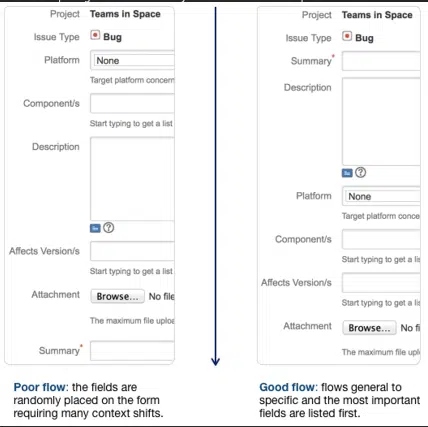
While the first one does capture all of the right data, the second screen has a much more intuitive flow. Ask a few people who use each screen on a regular basis if the flow is right. Fine tuning the flow will help users enter better data, making for a more optimized workflow for the entire team.
Dig Deeper: Mastering Bug Tracking in Jira Service Management
3. Fill out the field description
When integrating a custom field into JIRA Software, consider adding a description to clarify its purpose. This description helps users understand the required information for the field. To maintain screen compactness, keep the description brief. You can also utilize HTML in descriptions, enabling easy linkage to more detailed documentation. For instance, let’s examine a sample description for a field named “build number”:
“The build number represents the current software version. Refer to the build documentation for guidance on locating the build number.”
Providing user education significantly enhances team efficiency and effectiveness.
4. Respect the required option
use the required attribute carefully. There’s a strong inclination to mandate fields as required. After all, you need the data, don’t you? So, why not ensure users provide it? However, if users are uncertain about what to input, they might furnish erroneous data – and flawed data poses a greater challenge than the absence of data altogether. Removing bad data from searches is arduous and can turn reporting into a nightmare.
If necessitating a field is unavoidable:
- Provide an option to indicate “I don’t know.”
- Offer a clear field description (refer back to step 3).
Generally, people want to act in the right manner. If team members encounter artificial barriers, they may resort to bypassing them to express their views. Instead of complicating issue submissions, empower individuals to be thorough.
5. Remove unnecessary fields
Teams frequently undergo changes, and what held significance a year ago might not retain the same level of importance today. Users may say, “I absolutely require this field!” Yet, after a few months, the team might not utilize the field in the manner initially intended by the requester. In JIRA Software, it’s straightforward to conduct searches to determine the extent of usage for a specific field. For instance, suppose we introduced a field named “build number” to the bug issue type. We can subsequently execute two queries to see the percentage of utilization of that field.
Bugs that don’t have a build number
type = bug and “Build Number” is empty and created > “<date as per requirement>”
Bugs that have a build number
type = bug and “Build Number” is not empty and created > “date as per requirement”
We can then compare the number of bugs that have a build number with the ones that don’t. If the team isn’t effectively utilizing the build number field, they have a decision to make: do they require the field?
6. Spread out data entry
In numerous organizations, data gathering concerning specific issue types occurs throughout the workflow. For instance, addressing a bug typically involves providing details such as a summary and description upfront. However, it’s only upon fixing the bug that additional fields like resolution, fix version, and optionally, assignment to a code reviewer become necessary.
Using JIRA Software, administrators have the flexibility to tailor screens, enhancing the ease of data entry. Users reporting issues are presented with only the pertinent fields, streamlining their experience. Similarly, when an engineer reviews an issue, only the relevant fields for that task are displayed. This approach prevents individuals from feeling overwhelmed by an excess of fields all at once.
7. Scope each field
Administrators can tailor custom fields by restricting them to specific projects or making them universally accessible across all projects. This utilization of project contexts streamlines operations for all users, ensuring forms only display essential information, thus enhancing efficiency.
For customers managing extensive JIRA Software instances, Atlassian scaling guide offers valuable insights. It includes a dedicated section on optimizing custom fields to enhance the performance of your software instance.
Also Read : Top 10 Jira Software Plugins to Supercharge Your Workflow in 2024
8. Automate when feasible
Automation facilitates the efficient and accurate collection of data.
JIRA Software boasts a versatile REST API, simplifying the process for external applications to generate issues and fill in custom fields. Developers gain access to a vast pool of information that might otherwise be arduous or cumbersome for users to input manually. By integrating JIRA Software with your application, empower your engineers to streamline the issue creation process, ensuring higher-quality outcomes.
Through the REST API, engineers can obtain comprehensive details about reported issues without imposing extensive manual tasks on users.
Fields play a crucial role in the functionality of JIRA Software. As administrators, a primary responsibility is to guide users in adopting best practices for utilizing JIRA Software effectively. Leveraging fields optimally and mitigating potential drawbacks contributes to the overall success of JIRA Software for all users.
MicroGenesis, an Atlassian Platinum Partner, has worked with multiple clients around the world. We excel in Jira Software implementation by providing end-to-end services, including consulting, customization, integration, and support. Our expert team ensures seamless adoption, enhanced collaboration, and optimized project management tailored to your business needs.
Related Content:
- Adding custom fields : – Describes creating a custom field to collect information that isn’t available in the default system fields
- Managing custom fields :- Describes various topics like “Viewing custom fields”, “Identifying your fields”, “Managing custom fields”
- Configuring custom field contexts :- Describes topics on configure contexts for the existing field and then reuse it as you see fit.
- Editing or deleting custom fields :- Describes editing or deleting custom fields directly from the Custom fields page. For Jira Data Center, you can also delete multiple custom fields at once.
- Translating Custom Fields : – Describes translating the name and description of any custom field that you create. You can only select from the language packs that are installed in Jira.
- Analysing the usage of custom fields :- Having too many custom fields can clutter your Jira instance and affect its performance. It’s normal for these fields to grow over time as admins create testing fields and duplicates, and some fields are just no longer used. However, monitoring and cleaning up your fields is necessary to keep your instance quick and healthy.
- Optimizing custom fields :- Custom fields can have a huge impact on the performance of your Jira instance. You can decrease this impact and speed up your Jira by improving the configuration of your custom fields. With the custom fields optimizer, you can do it automatically.


